
Cleaning an in-ground pool with a robotic pool cleaner is a straightforward way to automate routine debris removal and surface scrubbing. Depending on the model, a robotic cleaner can clean the pool floor and may also handle walls and the waterline.
The process is simple: prepare the pool and cleaner, place the robot in the water, select the appropriate cleaning cycle, and let it complete its programmed route. After cleaning, remove the robot as instructed, empty and rinse its filter, and store it properly.
This practical, model-neutral step-by-step guide covers cleaning an in-ground pool with a robotic pool cleaner, including setup, operation, post-cleaning maintenance, cleaning frequency, and what the robot can and cannot replace.
Can a Robotic Pool Cleaner Clean an Inground Pool?
Yes, a robotic pool cleaner can clean an in-ground pool, but its cleaning coverage depends on the model and its supported features.
What a Robotic Pool Cleaner Can Clean
Most robotic pool cleaners are designed to collect dirt and debris from the pool floor. Depending on the model, they may also scrub and clean the walls or waterline.
Before choosing a cleaning mode, check which surfaces your specific robotic pool cleaner is designed to handle. Pool shape, surface type, and the cleaner's navigation system can also affect coverage.
What a Robotic Pool Cleaner Cannot Replace
A robotic pool cleaner handles physical cleaning, but it does not replace every part of pool maintenance. You still need to monitor and balance water chemistry, maintain the pool's filtration and circulation equipment, and remove debris or perform manual cleaning when necessary.
Think of the robotic cleaner as one part of an overall in-ground pool maintenance routine rather than a complete replacement for pool care.
What to Do Before Using a Robotic Pool Cleaner
Before using a robotic pool cleaner, remove large debris, check the cleaner and filter, and prepare the power equipment according to the manufacturer's instructions.
Remove Large Debris
Start by removing oversized debris such as leaves, branches, and other objects that the robotic cleaner is not designed to handle. This helps prevent unnecessary strain on the cleaner and allows it to focus on routine dirt and debris.
Check the Cleaner and Filter
Inspect the filter, brushes, tracks, and intake areas before starting a cleaning cycle. Empty or rinse a dirty filter as recommended by the manufacturer, and make sure no debris is blocking the cleaner's moving or intake components.
Check the Power Supply and Cable
For a corded robotic pool cleaner, inspect the power cable and place the power supply according to the manufacturer's safety instructions. For a cordless model, make sure the battery has sufficient charge for the planned cleaning cycle.
Place the power supply in a dry location and follow the minimum distance and GFCI requirements specified by your cleaner's manufacturer.
Confirm the Pool Is Ready for Cleaning
Keep swimmers out of the pool while the robotic cleaner is operating unless the manufacturer specifically provides different guidance. Also check any model-specific requirements before starting the cleaning cycle.
Related article: Can You Swim While a Robotic Pool Vacuum Is Running?
How to Clean an In-ground Pool With a Robotic Pool Cleaner
A robotic pool cleaner can handle the main physical cleaning process automatically once it is properly prepared and placed in the pool.
Quick Process Overview: Prepare → Place → Start → Clean → Retrieve → Filter → Rinse → Store → Repeat
Step 1: Prepare the Power Supply
For a corded robotic pool cleaner, connect and position the power supply according to the manufacturer's instructions. Keep the power supply in the required location and away from standing water.
For a cordless robotic pool cleaner, make sure the battery is adequately charged before starting the cleaning cycle.
Step 2: Place the Robotic Pool Cleaner in the Pool
Lower the cleaner into the pool according to the manufacturer's instructions. Make sure it is properly submerged before starting the cycle.
Do not force the cleaner into position or drag it across the pool surface unless the manufacturer specifically instructs you to do so.
Step 3: Position the Cleaner on the Pool Floor
Allow the robotic cleaner to settle into the water and begin from the position recommended by the manufacturer. Once operating, the robot should navigate the pool according to its programmed cleaning pattern.
Step 4: Select a Cleaning Cycle
Choose the cleaning mode that matches the condition of your pool and the surfaces you want to clean. Available options vary by model and may include floor, wall, or waterline cleaning.
Step 5: Start the Cleaning Cycle
Start the cleaning cycle using the power supply, control panel, remote, or mobile app if supported by your model. Once the cycle begins, allow the robot to navigate and clean independently.
Step 6: Let the Cleaning Cycle Finish
Let the robotic pool cleaner complete its recommended cleaning cycle rather than interrupting it unnecessarily. Cleaning time varies by model, pool size, selected mode, and operating conditions.
Step 7: Remove the Robotic Pool Cleaner
When the cycle is complete, stop the cleaner and retrieve it according to the manufacturer's instructions. Avoid using the power cable as a lifting method unless the manufacturer specifically allows it.
Step 8: Clean the Filter
Remove the filter or filter basket and empty the collected debris. Rinse it as recommended before reinstalling it for the next cleaning cycle.
A clean filter helps the robotic pool cleaner maintain effective debris collection during subsequent runs.
Step 9: Rinse and Store the Cleaner
Rinse the cleaner if required by the manufacturer, inspect the brushes, tracks, and intake areas for remaining debris, and store the unit according to its recommended storage conditions.
For corded models, manage the cable as instructed to help prevent unnecessary tangling and wear.
How Often Should You Run a Robotic Pool Cleaner?
For many residential pools, 2–3 cleaning cycles per week is a reasonable starting point, but the ideal schedule depends on pool use, debris, weather, and season.
For Regular Pool Maintenance
For many residential pools, running a robotic pool cleaner a few times per week can be a practical starting point. Adjust the frequency based on how quickly dirt, leaves, pollen, and other debris accumulate.
A pool that stays relatively clean may need fewer cleaning cycles, while a frequently used pool may benefit from more regular cleaning.
After Heavy Debris or Storms
Run the robotic pool cleaner after periods of heavy debris, such as strong winds or storms, once large objects have been removed manually.
Leaves, branches, and other oversized debris should be cleared before starting the robot if they exceed what the cleaner is designed to collect.
During High-Use Seasons
Pool cleaning needs can increase during periods of frequent swimming or heavier outdoor activity. Warmer seasons may also bring more debris and require a more consistent cleaning schedule.
Rather than following a rigid calendar, monitor the pool's condition and adjust the robotic cleaner's schedule as needed. Always stay within the cleaning frequency and cycle recommendations for your specific model.
Can a Robotic Pool Cleaner Clean Pool Walls and the Waterline?
Some robotic pool cleaners can clean pool walls and the waterline, but these capabilities depend on the model and its design.
Floor Cleaning
Floor cleaning is a core function of most robotic pool cleaners. The robot moves across the pool floor while its brushes loosen dirt and debris for collection by the onboard filter.
Wall Cleaning
Some models can climb pool walls and scrub vertical surfaces. However, wall-climbing performance can vary depending on the cleaner, pool surface, shape, and operating conditions.
If wall cleaning is important to your maintenance routine, check that the specific model supports wall cleaning before purchasing or selecting a cleaning cycle.
Waterline Cleaning
Waterline cleaning is also model-dependent. A cleaner designed for waterline cleaning can reach the area where the pool wall meets the water surface and remove accumulated dirt and residue.
Do not assume that every robotic pool cleaner supports waterline cleaning. Always check the manufacturer's stated cleaning coverage for your model.
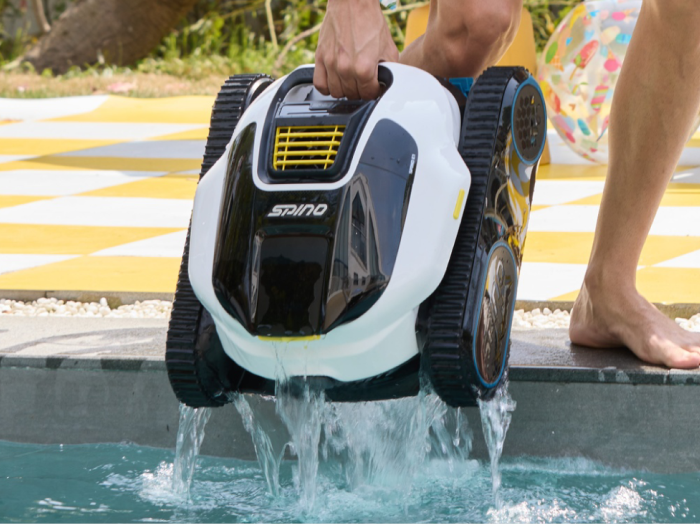
For homeowners looking for a cordless option, Mammotion SPINO E1 is one example of a robotic pool cleaner designed for automated floor, wall, and waterline cleaning.
How to Maintain a Robotic Pool Cleaner
Regular maintenance keeps a robotic pool cleaner ready for its next cleaning cycle and helps you identify debris buildup or component wear early.
Clean the Filter
Empty the filter after each cleaning cycle or as recommended by the manufacturer. Rinse away trapped dirt and debris before reinstalling the filter. A clogged filter can reduce the cleaner's ability to collect debris effectively.
Rinse the Cleaner
After removing the robot from the pool, rinse it as recommended to remove dirt, pool residue, and loose debris. Pay particular attention to areas where debris can collect.
Inspect Brushes, Tracks, and Intake Areas
Check the brushes, tracks, wheels, and intake areas for trapped debris or visible wear. Clear anything that could interfere with the cleaner's movement or debris collection.
If a component shows significant wear or damage, follow the manufacturer's replacement or service instructions.
Store the Cleaner Properly
Store the robotic pool cleaner according to the manufacturer's recommendations. Keep it in the appropriate environment and avoid leaving it exposed to conditions that could damage its components.
For corded models, manage the power cable as instructed to reduce unnecessary tangling and wear.
Common Robotic Pool Cleaner Mistakes to Avoid
Avoiding a few common mistakes can help a robotic pool cleaner operate more effectively and prevent unnecessary maintenance issues:
- Running the cleaner with a clogged filter: Limits debris collection and can affect cleaning performance. Always empty and rinse the filter regularly.
- Leaving large debris in the pool: Oversized debris may be unsuitable for the cleaner. Remove leaves, branches, and large objects manually first.
- Ignoring cable management: A tangled cable can interfere with operation. Arrange and store the cable according to the manufacturer's instructions.
- Assuming every robot cleans walls: Wall-climbing capability varies by model. Always check the model's supported cleaning surfaces.
- Assuming every robot cleans the waterline: Waterline cleaning is not universal. Confirm waterline coverage before selecting a cleaner.
- Treating the robot as complete pool maintenance: Robotic cleaning does not replace water chemistry or equipment care. Continue regular pool maintenance separately.
- Storing the cleaner incorrectly: Improper storage can affect the equipment over time. Follow the manufacturer's storage recommendations.
Frequently Asked Questions
Cleaning time varies by model, pool size, cleaning mode, and operating conditions. Use the cleaning cycle recommended for your specific robotic pool cleaner.
For many residential pools, a few cleaning cycles per week can be a practical starting point. Adjust the schedule based on pool use, debris, weather, and season.
Some models can clean pool walls, but wall-climbing capability varies. Check the manufacturer's specifications for your specific model.
Some robotic pool cleaners support waterline cleaning, while others are designed for floor or wall cleaning only. Confirm the cleaner's supported coverage before use.
Many robotic pool cleaners operate independently of the pool's main circulation system because they have their own motor and filtration system. However, operating requirements vary by model, so follow the manufacturer's instructions.
It depends on the model. Some manufacturers provide specific guidance on how long the cleaner can remain submerged, while others recommend removing it after a cleaning cycle. Always follow the instructions for your cleaner.
Final Takeaway
Cleaning an inground pool with a robotic pool cleaner is a simple process: prepare the pool and cleaner, start the appropriate cleaning cycle, then clean and store the robot after use.
For the best results, adjust the cleaning schedule to your pool's debris level and usage, and check your model's capabilities for floor, wall, and waterline cleaning. A robotic cleaner can automate much of the physical cleaning, but regular water chemistry checks and other pool maintenance are still necessary.
Did you like this article? Add us as a preferred source to find us more easily on Google.